Local LLMs 101
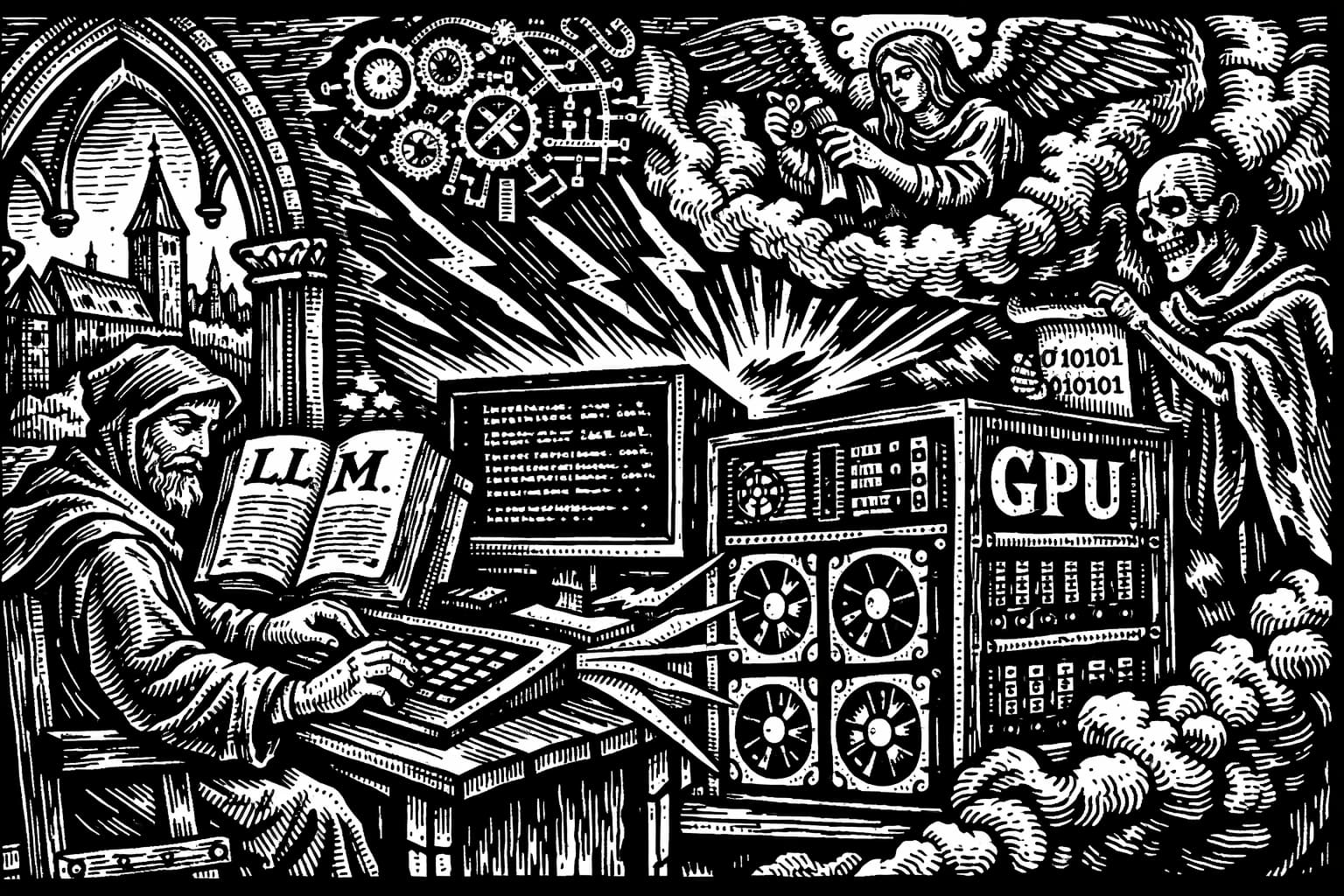 What it must have felt like to experience the sheer joy of local large language models back in the 1500s.
You downloaded a 14B model, loaded it into your local inference server, and got either gibberish output or an out-of-memory crash. This guide explains why, and how to avoid it next time.
We’ll cover how models generate text, what eats your VRAM, how to pick a model that fits your hardware, and how to actually run one locally.
Inference: what LLMs actually do
Inference means running a trained model to produce output. The model doesn’t learn anything new during inference — it just does math on its existing parameters.
At every step, the model answers one question: given everything so far, what token probably comes next? One token at a time.
The sequence of it all
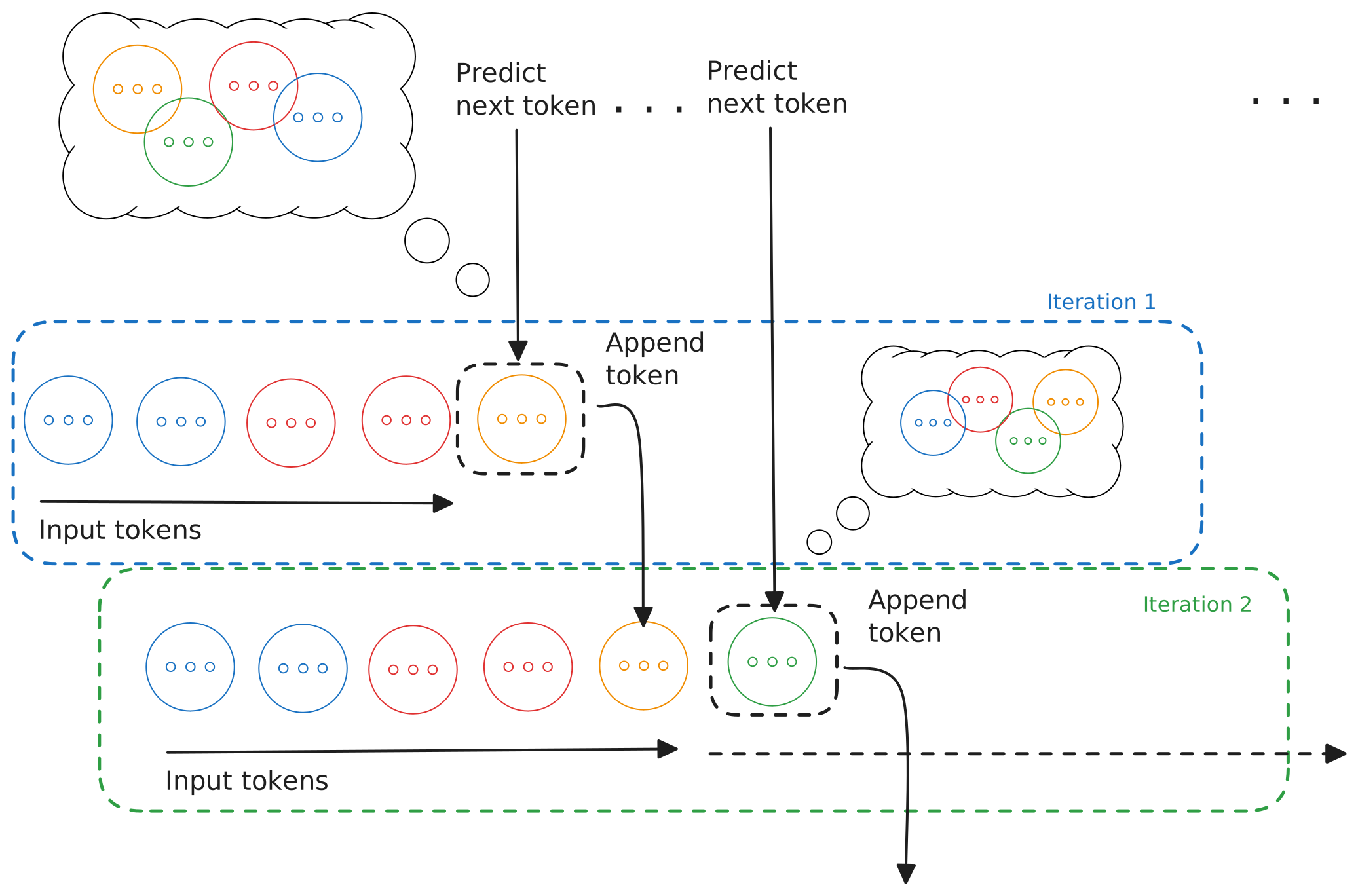
A model operates on a sequence of tokens:
[input tokens] → predict next token → append → repeatEach step uses your prompt, all previously generated tokens, the model’s weights, and the key/value cache (more on that later). That loop is the whole generation process.
Tokens
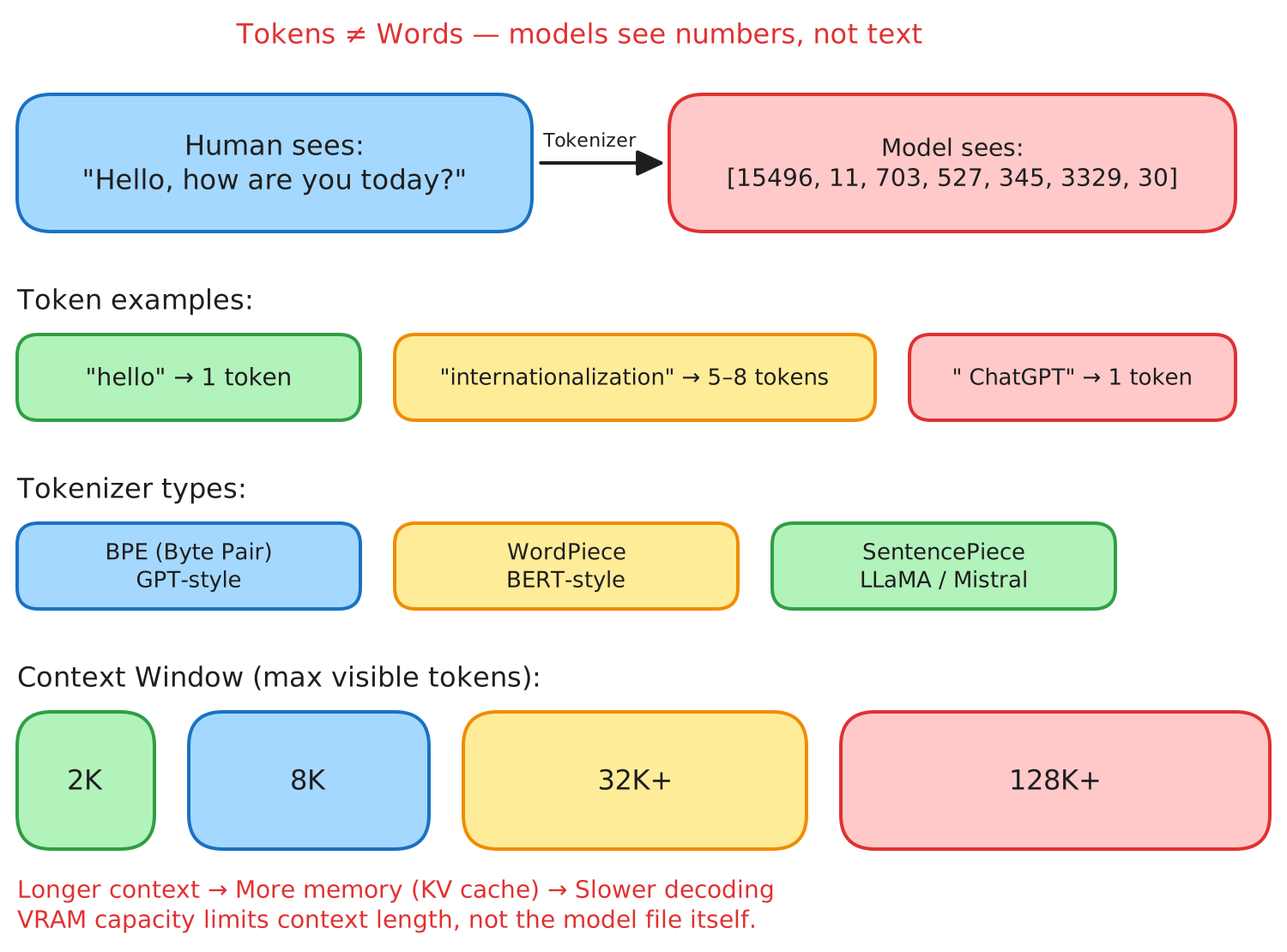
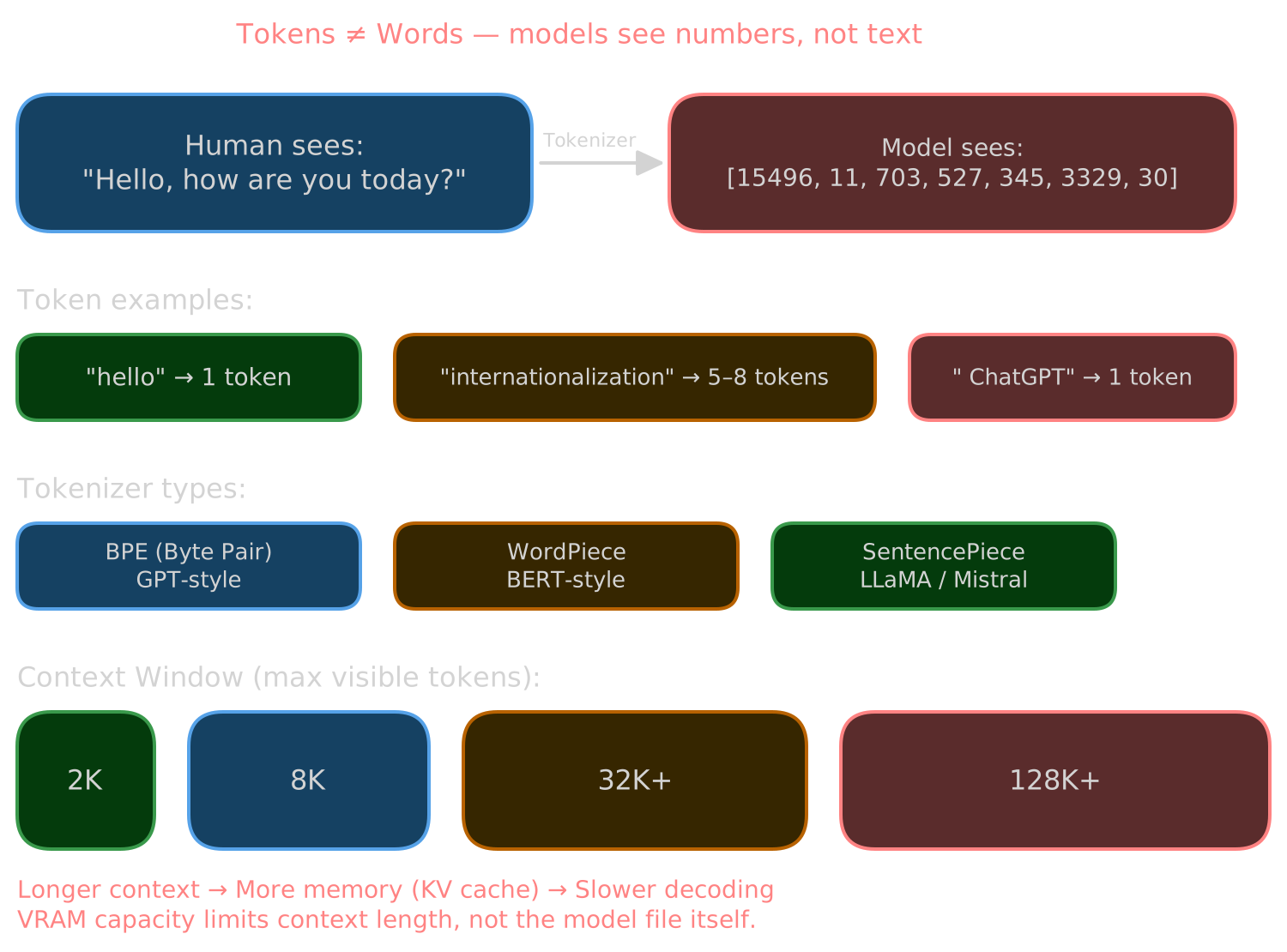
Tokens are not words. They’re the units of text a model actually sees — whole words, word fragments, punctuation, whitespace, Unicode pieces.
Some examples (varies by tokenizer):
- “hello” → 1 token (sometimes 2–3)
- “internationalization” → 5–8 tokens
- ” ChatGPT” (note the leading space) → often its own token
Tokenizers
A tokenizer converts text to token IDs and back. The common types are Byte Pair Encoding (BPE, used by GPT-style models), WordPiece (BERT-style), and SentencePiece (LLaMA, Mistral). Inside the model, tokens are just integers. You see text; the model sees numbers.
Context window
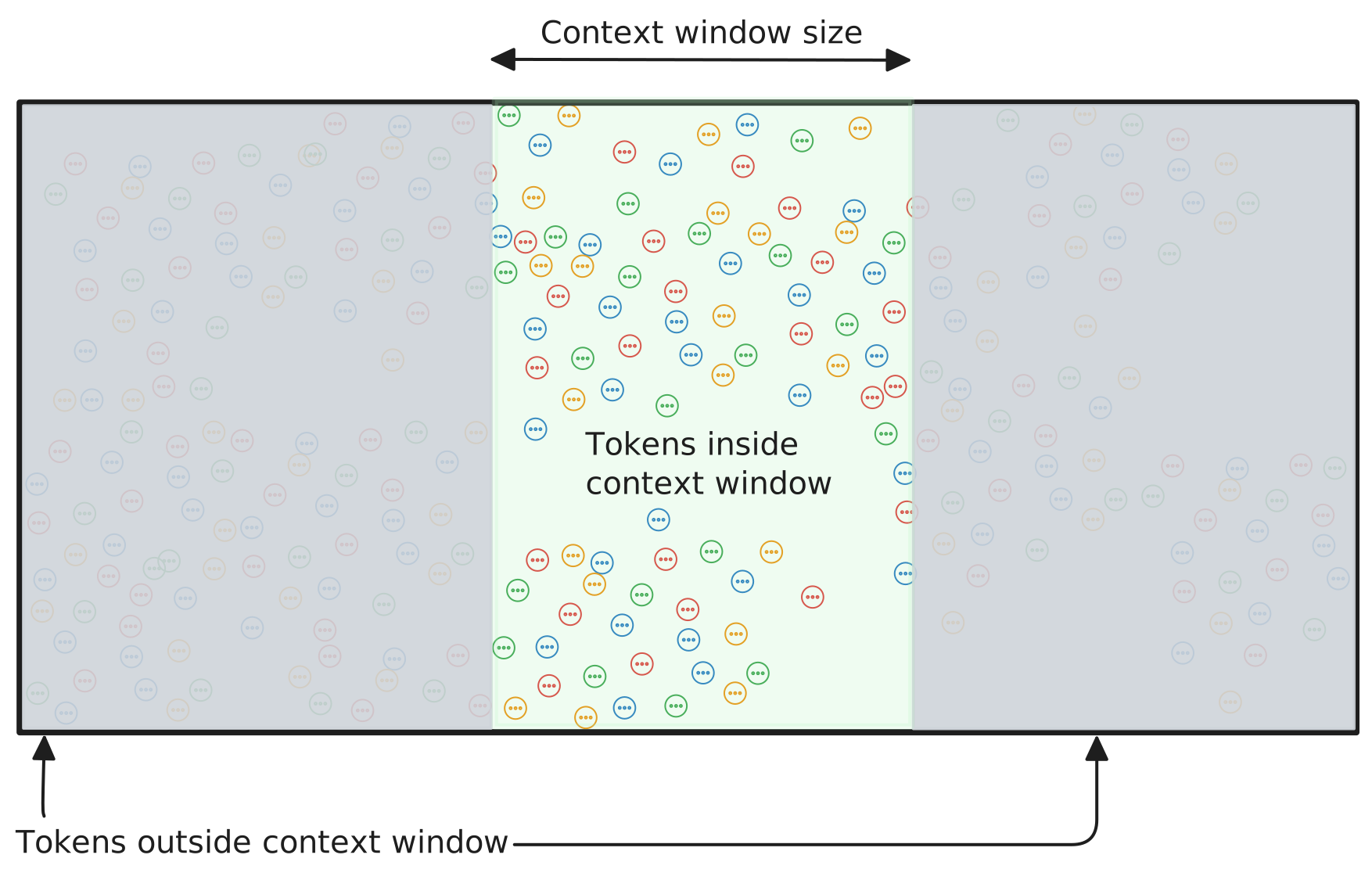
The context window is the number of tokens a model can see at once — 2K, 8K, 32K, 128K, depending on the model. Longer context means more memory, a larger KV cache, and slower decoding. Your VRAM is what actually limits context length, not the model file.
Models, weights, and parameters
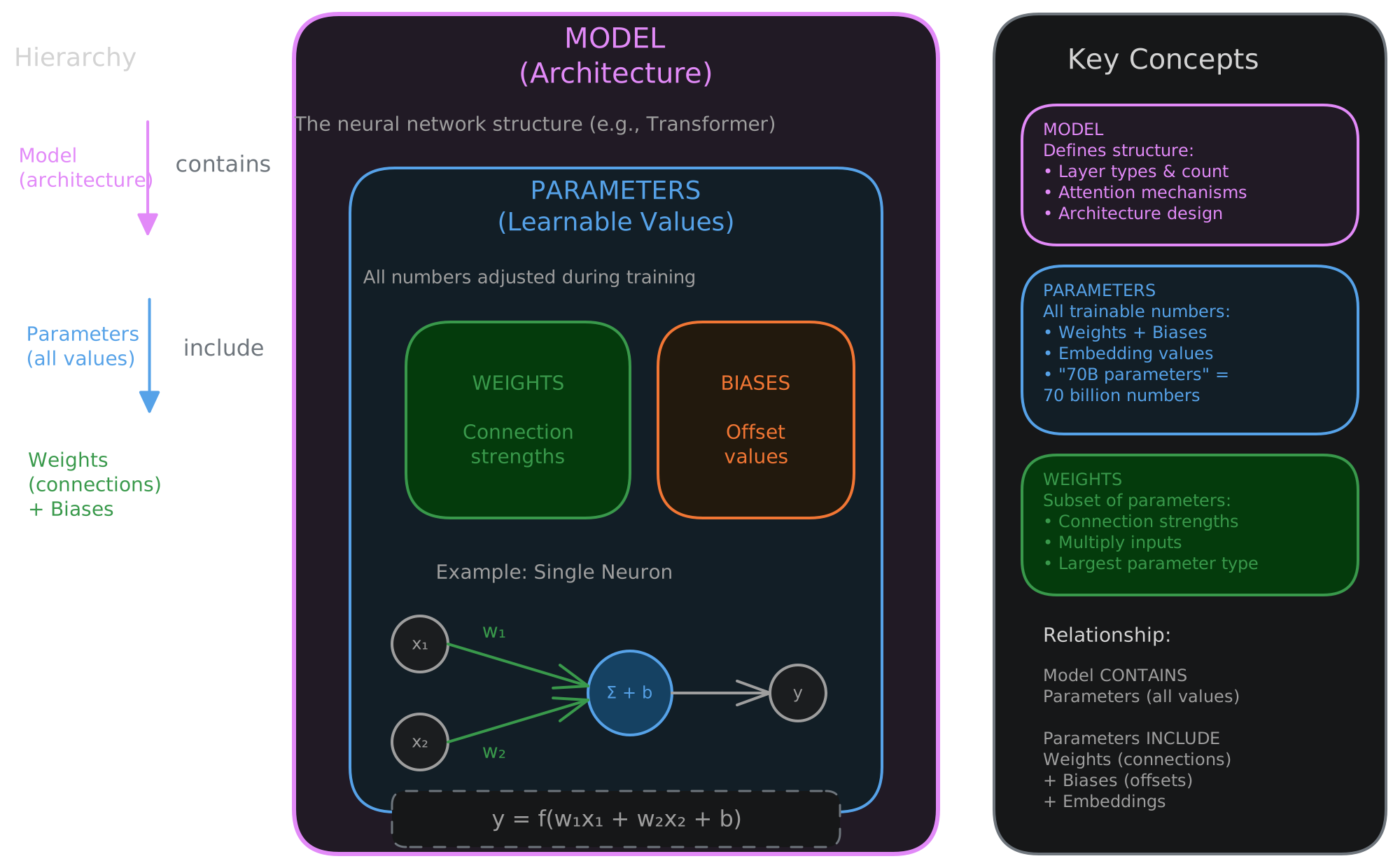
Parameters (weights)
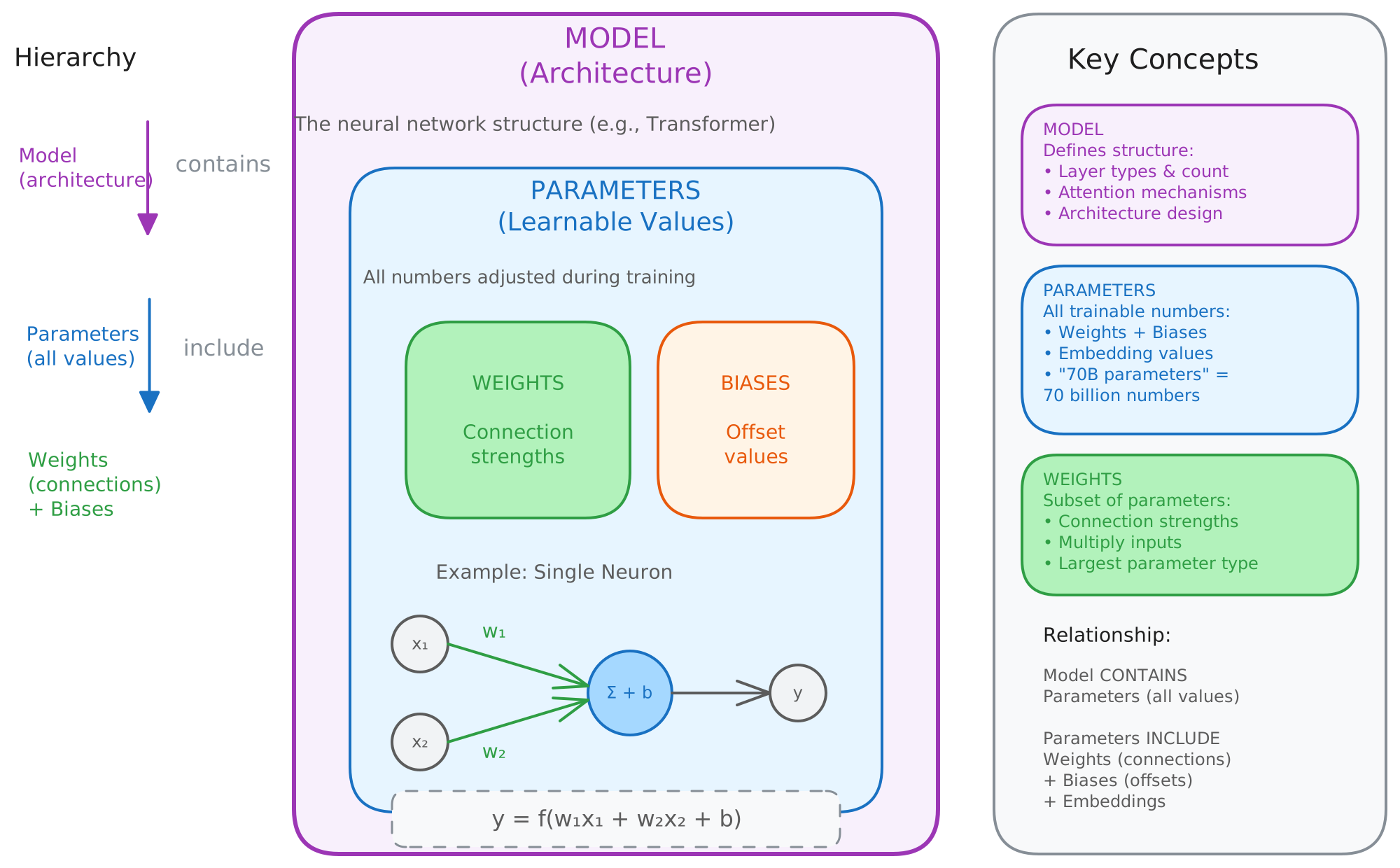
Parameters are a model’s learned numerical values. They encode language structure, patterns, and statistical associations from training. People use “parameters” and “weights” interchangeably.
Granite 4 3B has roughly 3 billion parameters. Ministral-3 14B has about 14 billion. Even larger models like GLM5 or Kimi K2.5 have hundreds of billions or even trillions of parameters. These models need more VRAM, tend to be more capable, and run slower.
When people say “this model knows things,” what they mean is: the weights encode statistical patterns learned during training.
What makes up a model?
A model is more than a file full of weights. A complete model includes architecture (transformer structure), weights, a tokenizer, configuration (layer counts, dimensions, special tokens), a chat template (for chat/instruct models), and license metadata.
If any of those are missing, you’ll get gibberish output, broken formatting, or a model that won’t follow instructions.
The transformer
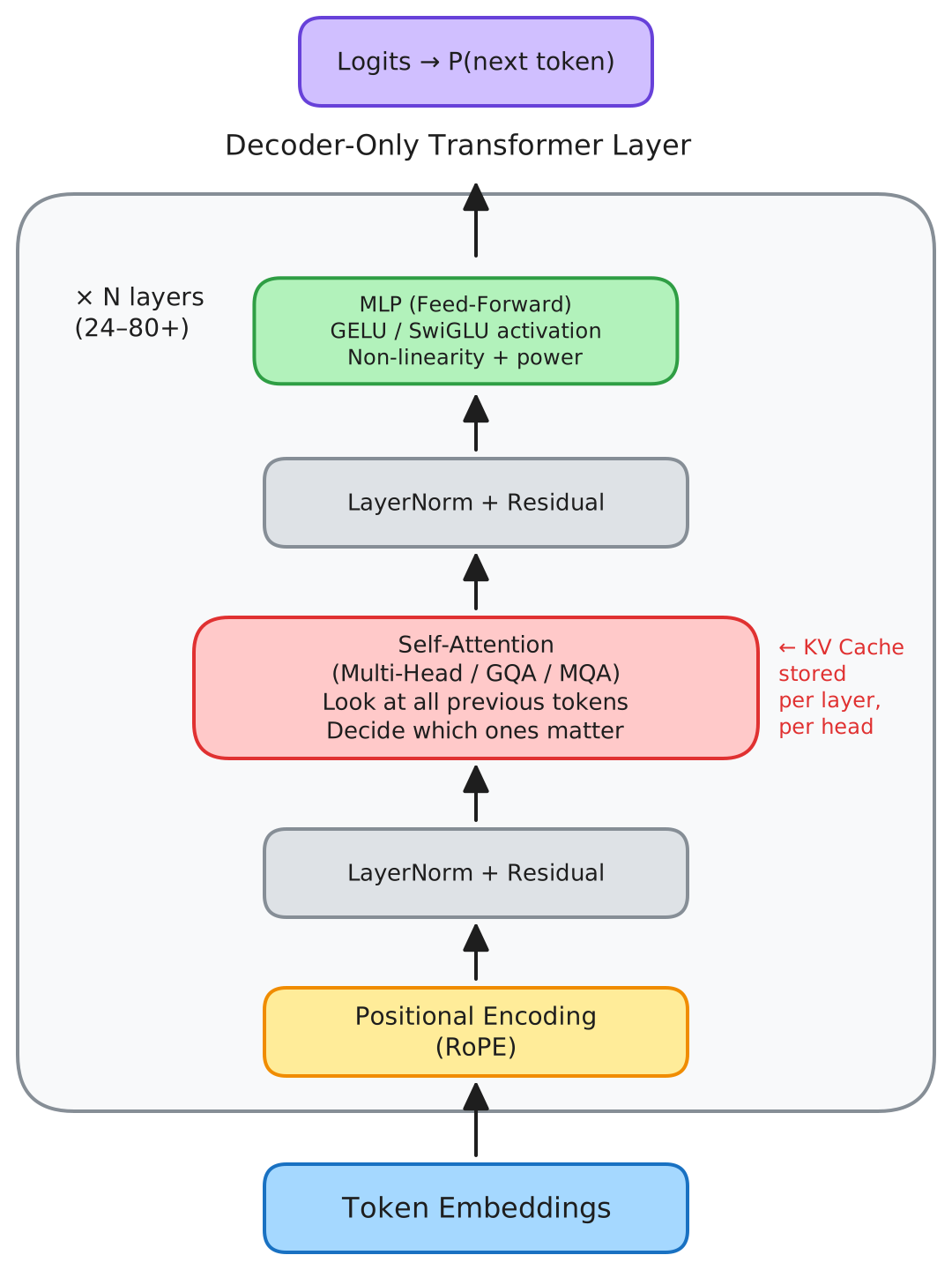
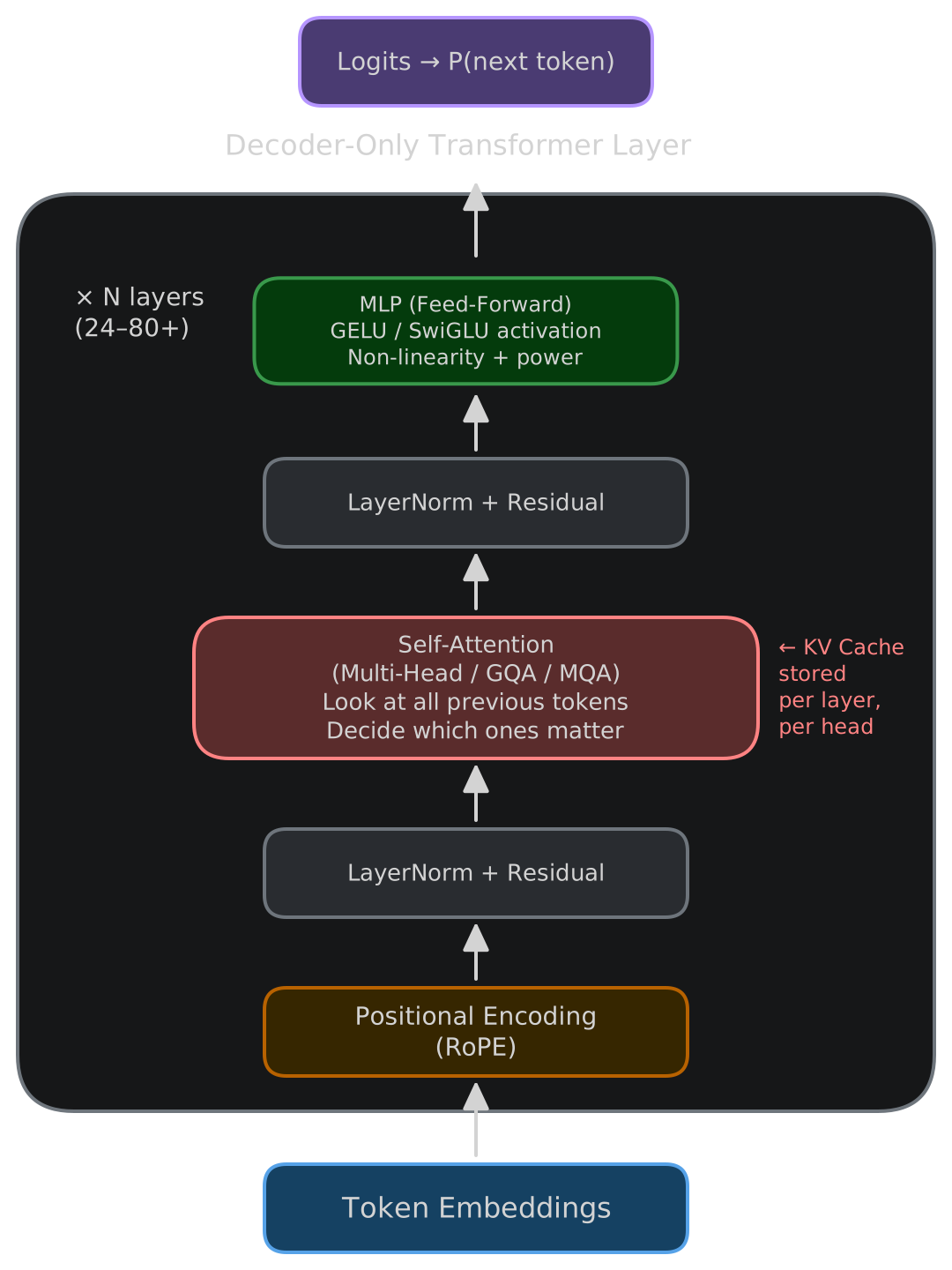
Almost every modern LLM uses a decoder-only transformer architecture, optimized for sequence prediction.
What transformers do
Transformers use self-attention to process token sequences. They look backward at previous tokens, decide which ones matter most for the current prediction, and output probabilities for the next token.
Transformer layers
Models stack many layers: 24 for small models, 32 for 7B-class, 80+ for 70B and up. Every generated token passes through all layers, every time.
You can offload layers to CPU, GPU, or TPU in various combinations, but VRAM capacity and bandwidth remain the bottleneck.
Inside one transformer layer
Self-attention
Self-attention figures out which previous tokens are relevant to the current prediction. Variants include Multi-Head Attention, Grouped Query Attention (GQA), and Multi-Query Attention (MQA) — the latter two save memory and bandwidth.
Multilayer perceptron (MLP)
The MLP adds non-linearity and expressive power. It’s typically two linear layers with a GELU or SwiGLU activation between them.
Positional encoding
Without position information, the model has no concept of word order. Modern models use Rotary Positional Embeddings (RoPE) to encode where each token sits in the sequence.
Residual connections + LayerNorm
These stabilize deep networks and prevent gradient collapse.
Putting it together
The transformer is decoder-only, predicts one token at a time using self-attention over all prior tokens, stacks this process many times, and outputs logits that become probabilities for the next token.
f_θ(sequence) → P(next_token)Everything else is repetition of that process.
Generation: how text appears
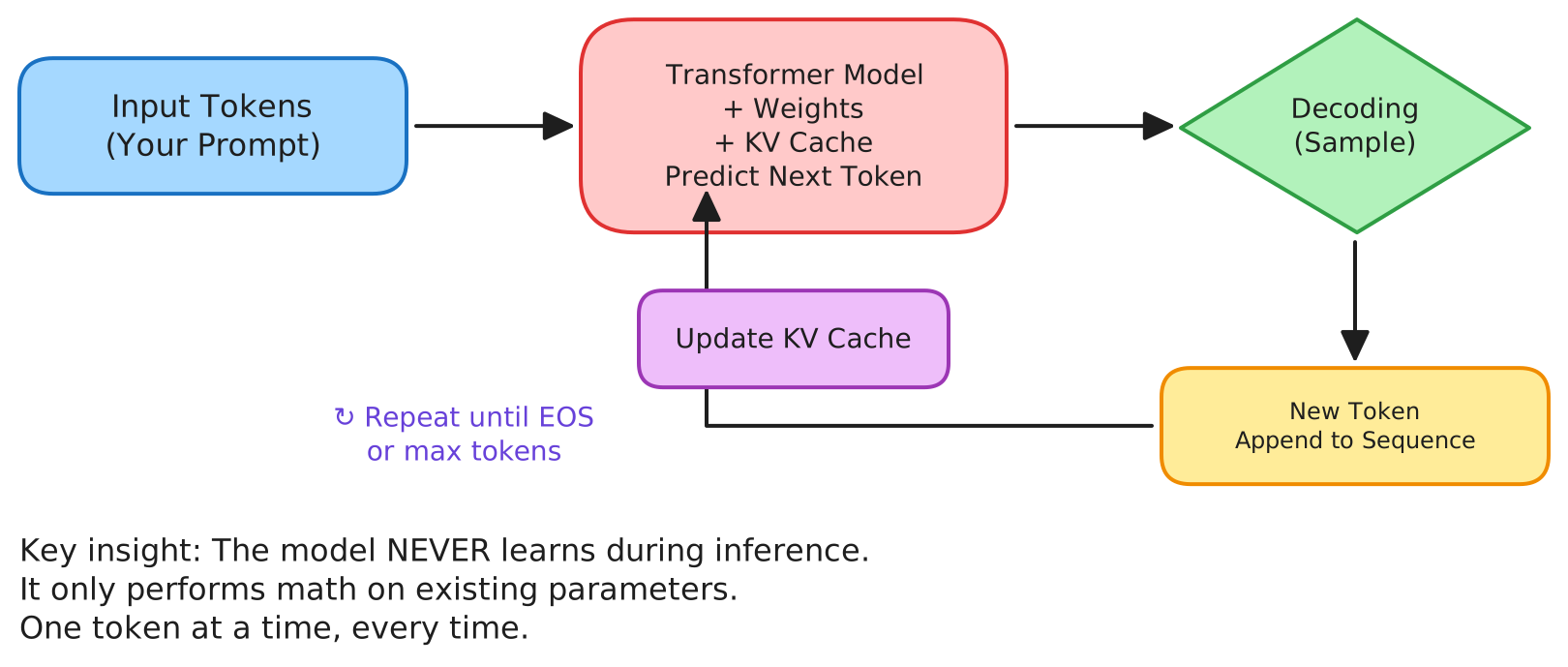
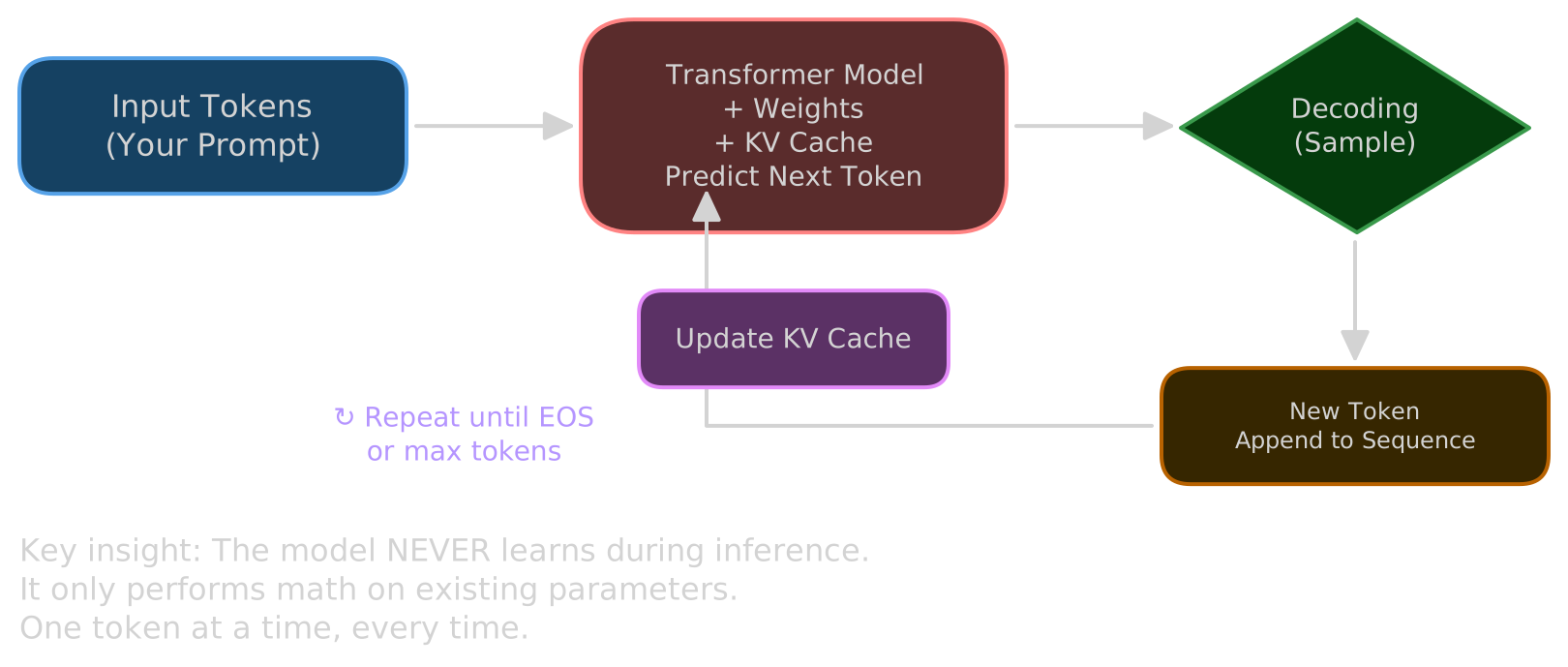
Generation is stepwise: predict probabilities, choose a token, append it to the sequence, update the KV cache, repeat. It stops when the model emits an end-of-sequence token, hits the max token limit, or you interrupt it.
There’s no “thinking ahead” happening. It’s repeated prediction, one step at a time.
Decoding: choosing the next token
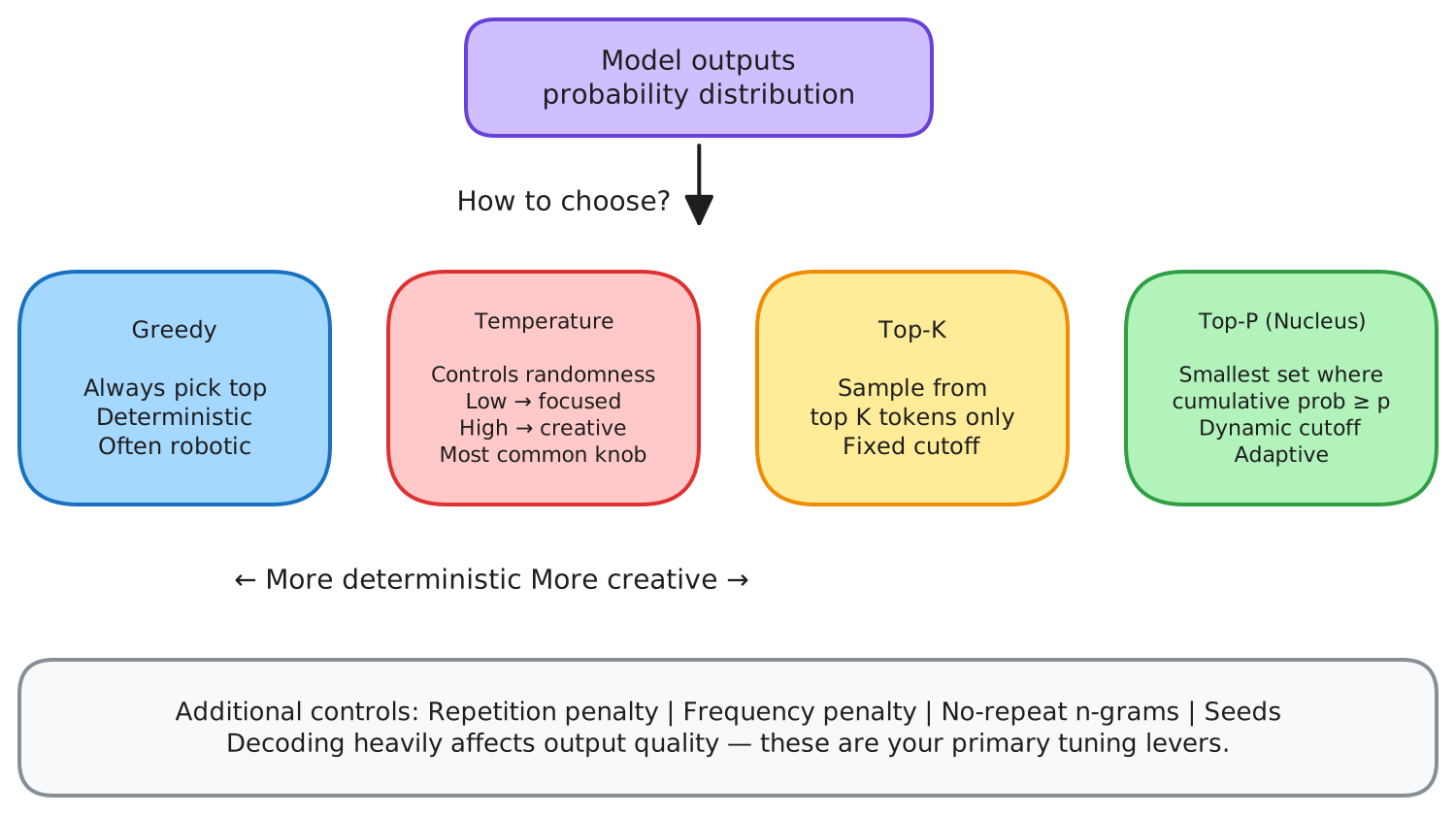
The model outputs probabilities for every possible next token. How you sample from those probabilities changes the output dramatically.
Greedy always picks the highest-probability token. Deterministic, but often robotic. Temperature controls randomness — lower values make output more focused, higher values make it more varied. Top-k restricts sampling to the top K candidates. Top-p (nucleus sampling) samples from the smallest set of tokens whose probabilities add up to at least p.
You can also apply repetition penalties, frequency penalties, no-repeat n-grams, and deterministic seeds. These settings matter more than most people realize.
Key/value cache (session memory)
The KV cache stores attention states for previously processed tokens — it’s the model’s working memory during inference. It grows linearly with context length, is stored per layer and per head, and dominates VRAM usage for long conversations.
Rough numbers for a 7B-class model: ~0.5 MB per token. At 4K tokens, that’s about 2 GB just for the KV cache. Many runtimes support 4-bit and 8-bit KV cache quantization to cut this down.
VRAM: the real bottleneck
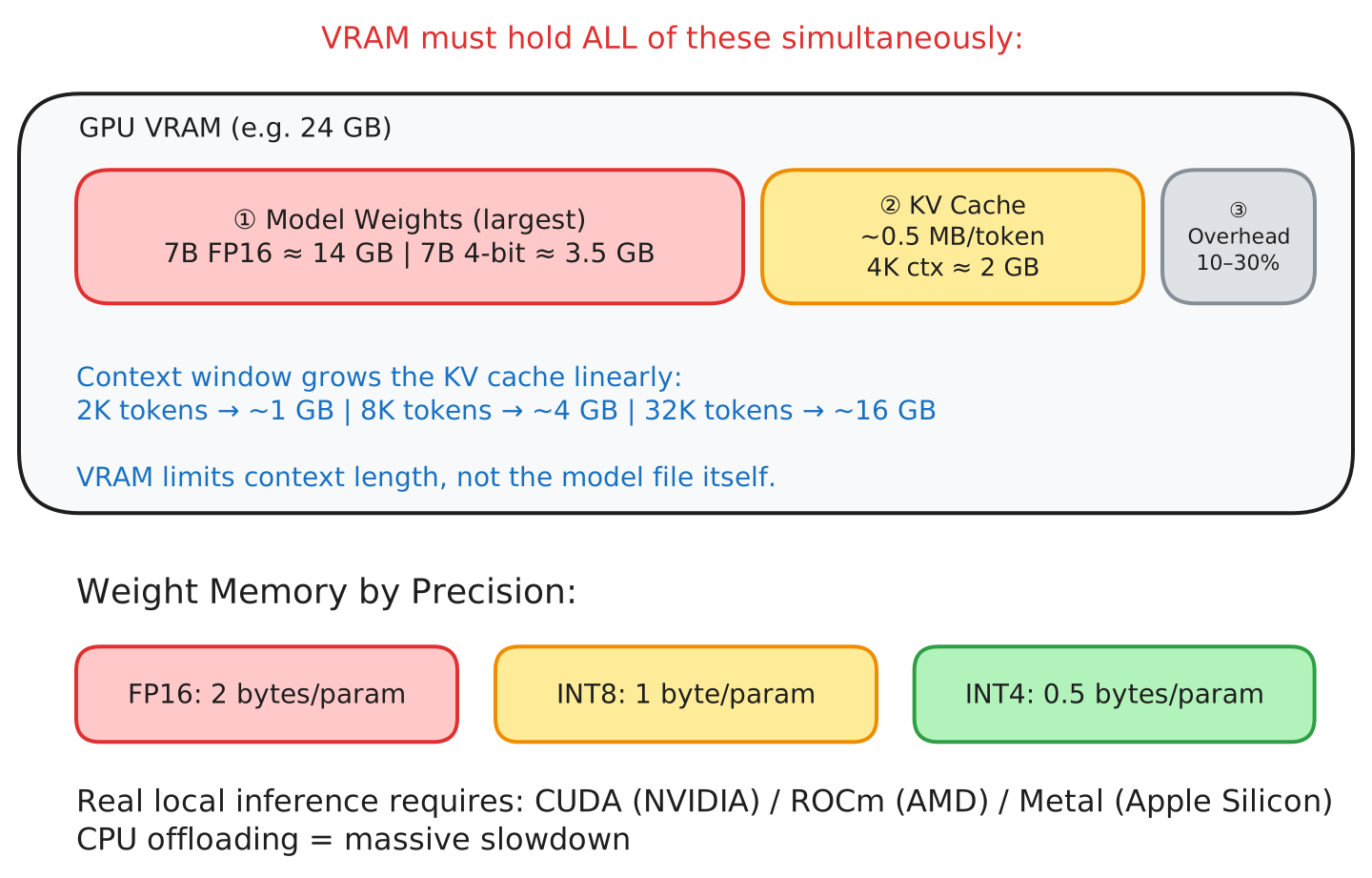
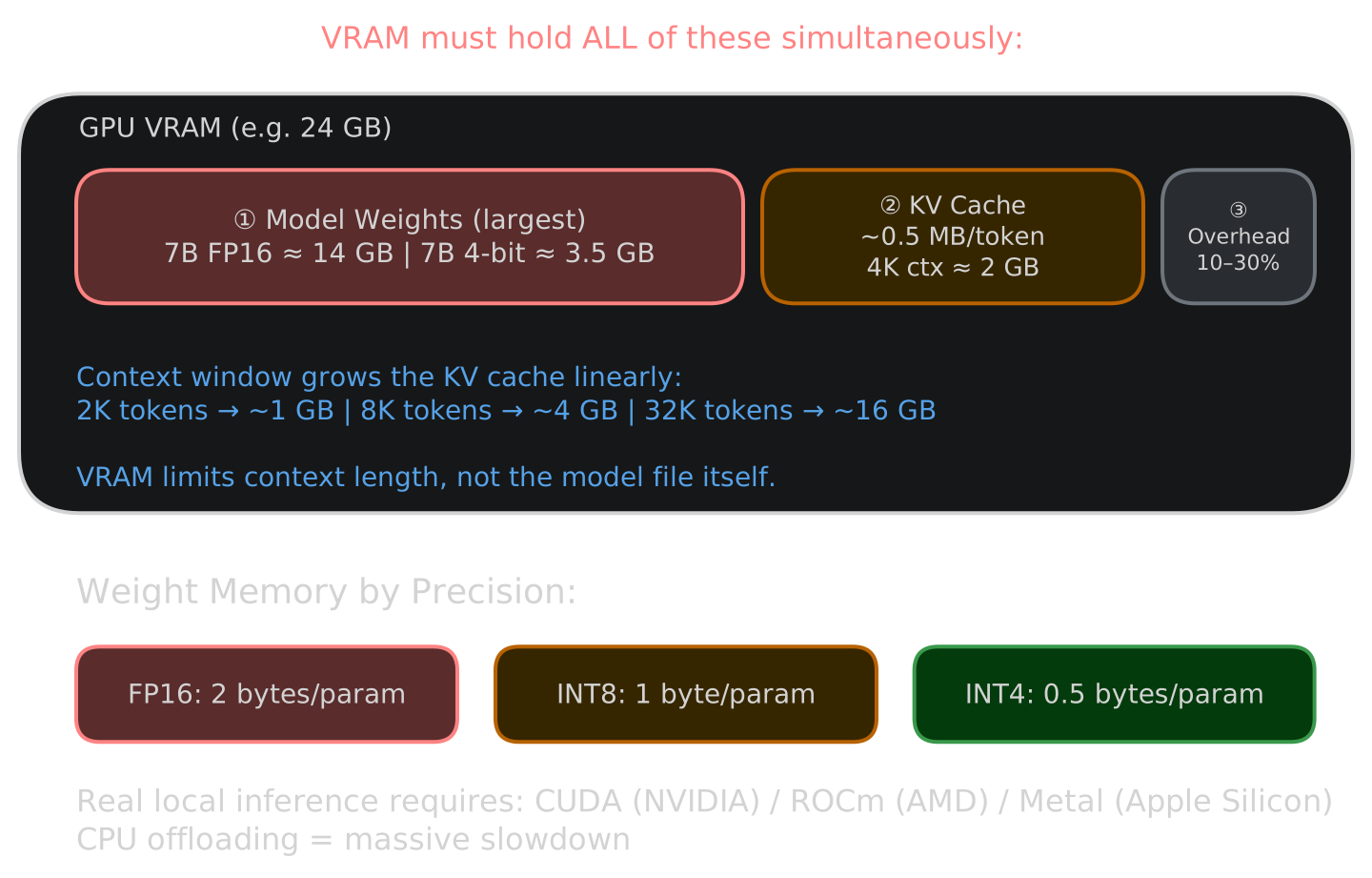
VRAM has to hold three things at once: model weights, KV cache, and runtime overhead.
Weight memory (approximate)
| Precision | Memory |
|---|---|
| FP16 | ~2 bytes / parameter |
| 8-bit | ~1 byte / parameter |
| 4-bit | ~0.5 bytes / parameter |
Examples:
- 7B FP16 → ~14 GB
- 7B 4-bit → ~3.5 GB
Factor in 10–30% overhead on top of that.
Worked example: sizing a model for your GPU
Say you want to run Qwen 2.5 7B at Q4_K_M quantization on a 16 GB GPU.
- Weights: 7B × 0.5 bytes ≈ 4.4 GB (GGUF Q4_K_M files are slightly larger than raw 4-bit due to metadata and mixed quantization)
- KV cache at 4K context: ~0.5 MB/token × 4,096 tokens ≈ 2 GB
- Runtime overhead: ~1 GB
- Total: ≈ 7.4 GB — fits comfortably on a 16 GB GPU
Now push context to 32K: the KV cache alone hits ~16 GB. You’re OOM before even loading the weights.
This is why context length, not model size, is often what actually kills you. Do this math before downloading a model:
Total VRAM ≈ (parameters × bytes_per_param) + (context_tokens × 0.5 MB) + 1 GB overheadIf total exceeds your GPU’s VRAM, either reduce context length, use a more aggressive quantization, or pick a smaller model.
CPU vs GPU
Prefer GPUs. CPUs can run quantized models, but slowly — CPU offloading is a massive performance hit. For acceptable inference speed, you need CUDA (NVIDIA), ROCm (AMD), or Metal (Apple Silicon).
Quantization
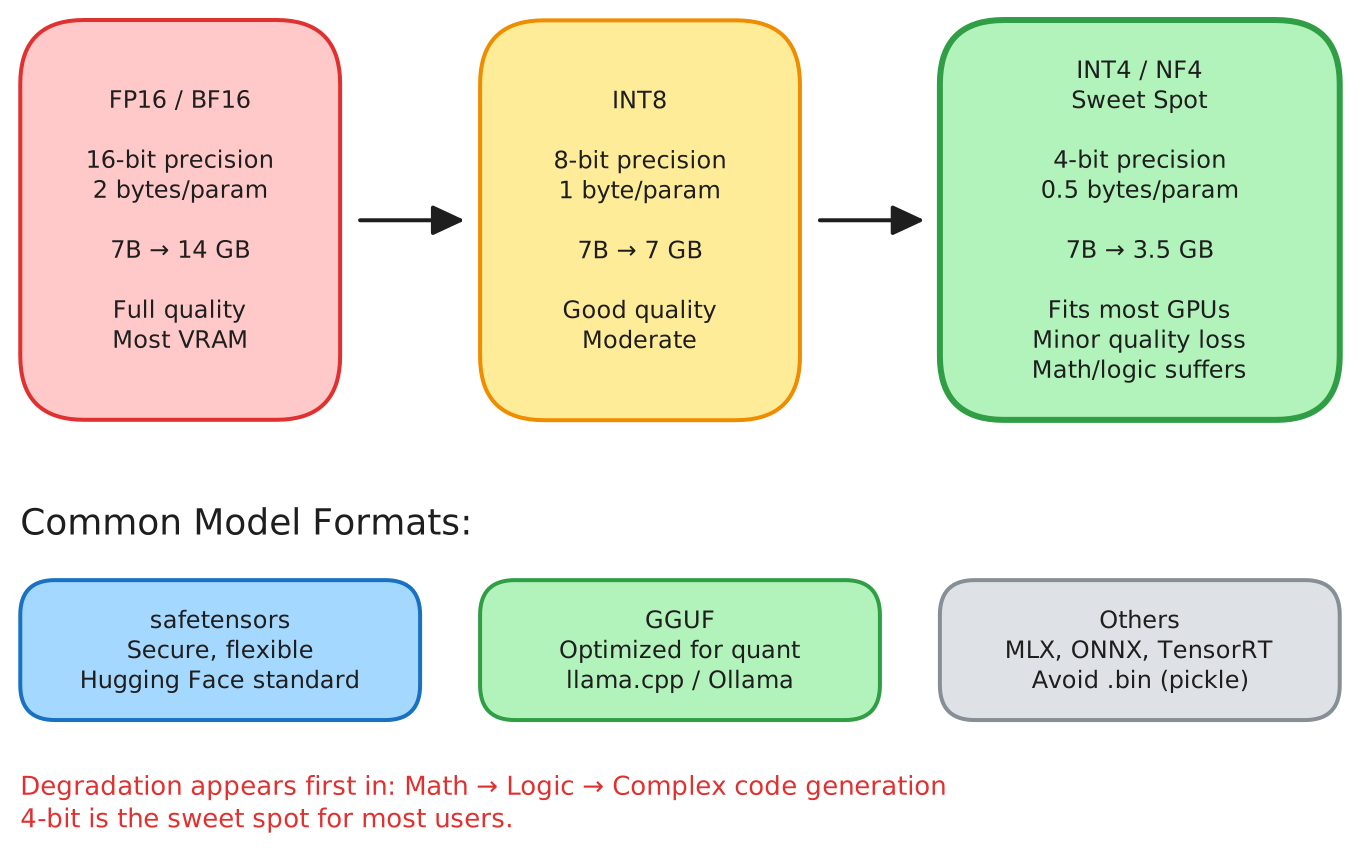
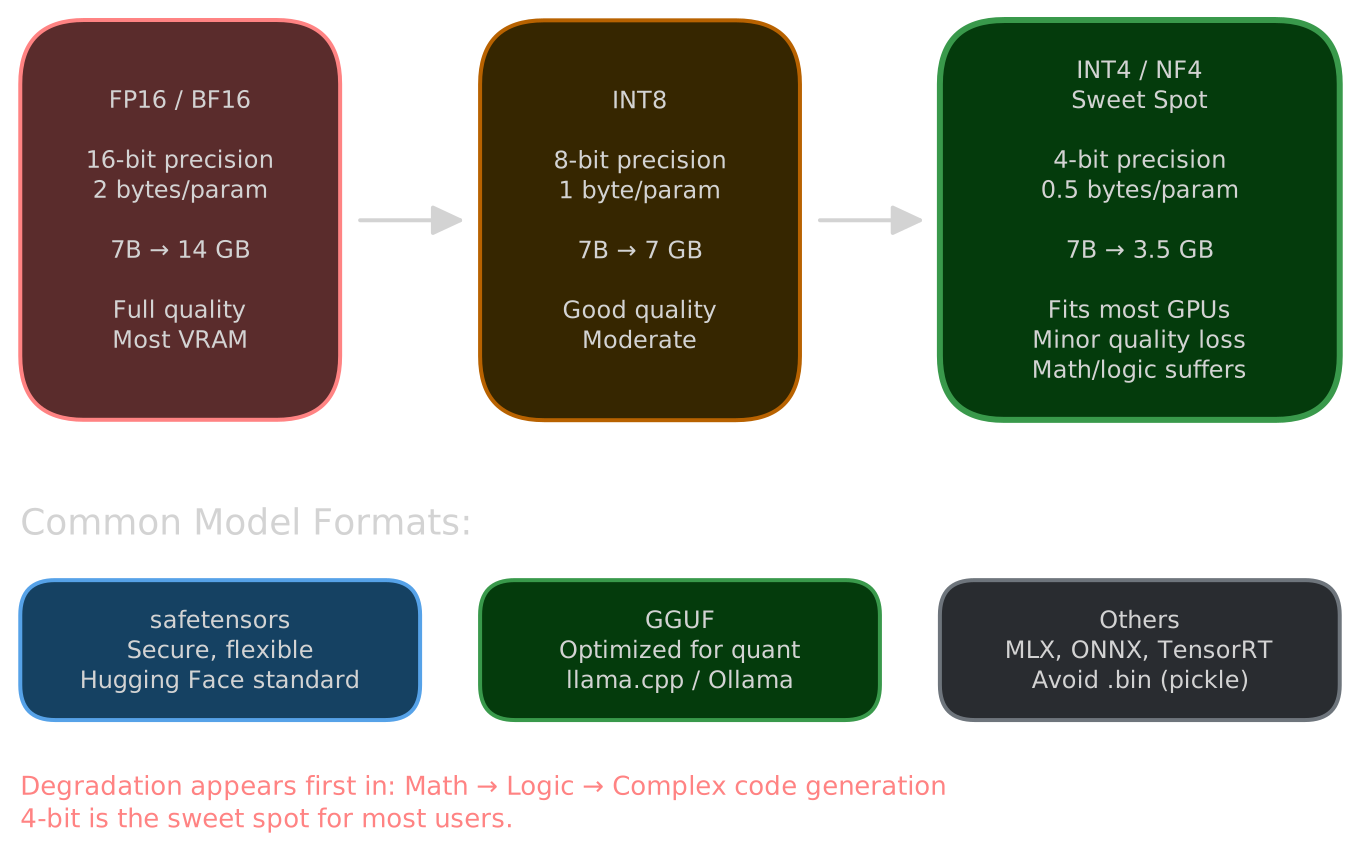
Quantization reduces the numerical precision of weights to save memory. FP16/BF16 is full quality, INT8 is moderate compression, and INT4/NF4 is aggressive compression.
4-bit is the sweet spot for most people — you save a lot of VRAM with only minor quality loss on typical tasks. Where it starts to hurt is math, logic, and complex code generation.
Model formats and runtimes
PyTorch + safetensors is the standard format — secure (no pickle), flexible, and what Hugging Face uses.
GGUF is llama.cpp’s format, optimized for quantization and portable across CPU and GPU. If you’re running models locally on your own hardware, this is probably what you want.
Other formats include MLX, ONNX, TensorRT-LLM, and MLC. Avoid legacy .bin files — they use pickle and can execute arbitrary code.
Serving local models
Three good options depending on what you need:
llama.cpp gives you a lightweight, OpenAI-compatible server with fine-grained control over GPU layers, context size, and quantization. If you’re comfortable with a terminal, start here.
vLLM is built for throughput — continuous batching, production-grade serving, good for multi-user or API-heavy workloads.
LM Studio is a desktop app with a GUI for downloading, configuring, and running models. Quickest way to get started if you don’t want to touch the command line.
ExLlama V3 is worth looking at for fast GPU inference. You can also wrap things in FastAPI or Flask if you need custom endpoints.
Worth noting: local doesn’t mean offline. It means self-hosted.
Quick start with llama.cpp
# Download a GGUF model (example from Hugging Face)
huggingface-cli download bartowski/Llama-3.2-3B-Instruct-GGUF \
  --include "Llama-3.2-3B-Instruct-Q4_K_M.gguf" \
  --local-dir models/

# Start the server with explicit context size and GPU layers
llama-server \
  -m models/Llama-3.2-3B-Instruct-Q4_K_M.gguf \
  --ctx-size 4096 \
  --n-gpu-layers 35 \
  --host 0.0.0.0 \
  --port 8080
The --n-gpu-layers flag controls how many transformer layers run on GPU vs CPU. Set it as high as your VRAM allows, and back it off if you hit OOM errors.
Chat vs base models
Base models aren’t instruction-tuned. They need few-shot prompting and will happily produce nonsense if you try to chat with them.
Chat/instruct models are fine-tuned for dialogue, but they require the right chat template. Use the wrong template (or none) and you get garbage output. Use apply_chat_template() in Transformers, or let llama.cpp, vLLM, and LM Studio handle it automatically.
Example using Python Transformers:
from transformers import AutoTokenizer

tokenizer = AutoTokenizer.from_pretrained("meta-llama/Llama-3.2-3B-Instruct")

messages = [
    {"role": "system", "content": "You are a helpful assistant."},
    {"role": "user", "content": "What is quantization?"},
]

# This applies the model's expected chat format automatically
prompt = tokenizer.apply_chat_template(messages, tokenize=False, add_generation_prompt=True)
print(prompt)
Skipping this step is one of the most common causes of gibberish from chat models.
Fine-tuning (briefly)
Most people don’t need full fine-tuning. If you do, LoRA and QLoRA are the practical options — lightweight adapter layers that need minimal VRAM and can be merged or swapped.
But before reaching for fine-tuning, try prompt engineering, few-shot examples, RAG, or agents with tool use. These solve most problems without the overhead of training.
Common problems
Out of memory (OOM)
Process crashes, CUDA OOM errors, or the system silently kills the process. This usually happens because people check that the model file fits in VRAM but forget about KV cache growth. A 4.4 GB model file can easily consume 10+ GB at long context lengths.
To debug:
# Check actual VRAM usage (NVIDIA)
nvidia-smi

# Check VRAM usage (Apple Silicon)
sudo powermetrics --samplers gpu_power -i 1000 -n 1
Fixes, in order of what helps most:
- Reduce context length — this is the single biggest lever.
- Use more aggressive quantization (Q4_K_M → Q3_K_S).
- Enable KV cache quantization if your runtime supports it.
- Pick a smaller model.
Gibberish output
Repeated tokens, broken formatting, nonsensical responses, the model echoing your prompt back at you. This almost always means the chat template is wrong or missing. Chat models expect input formatted with specific special tokens (like <|begin_of_text|>, <|start_header_id|>). Send raw text and the model sees something it was never trained on.
Fix it: make sure you’re using a chat/instruct model (not base), use apply_chat_template() or let your runtime handle formatting, and lower temperature if output is incoherent but formatted correctly.
Slow performance
Single-digit tokens per second, long pauses before output starts. If the model doesn’t fit entirely in VRAM, layers spill to system RAM. Each token then has to shuttle data between CPU and GPU across a bus that’s orders of magnitude slower than GPU memory bandwidth. Even offloading a few layers can halve throughput.
Fixes: make sure all layers are on the GPU (--n-gpu-layers high enough in llama.cpp), enable FlashAttention if available, and verify your GPU drivers are current with the right backend active (CUDA, ROCm, or Metal).
Unsafe models
Avoid random .bin files — they use Python pickle, which can execute arbitrary code on load. Don’t use trust_remote_code unless you’ve actually read the code it runs. Prefer safetensors format, which is designed to be safe to load from untrusted sources.
Why bother running locally?
You get full control over decoding and prompts, no per-token billing, privacy, no network latency, and the ability to customize everything. The tradeoff is real, though: hardware limits, driver headaches, a fragmented ecosystem, and more operational work than just calling an API.
Checklist
- Pick a chat-tuned model
- Size it for your VRAM
- Choose quantization
- Install runtime
- Verify memory fit
- Use correct chat template
- Tune decoding
- Benchmark your task
- Serve via local API if needed
Glossary
- Token — smallest unit processed by a model
- Context window — max tokens visible at once
- KV cache — attention memory during inference
- Quantization — lower-precision weights to save memory
- RoPE — rotary positional embeddings
- GQA/MQA — efficient attention variants
- Decoding — token selection strategy
- RAG — retrieval-augmented generation
The one thing to remember
VRAM is a fixed budget shared between model weights, KV cache, and runtime overhead. Every choice you make — model size, quantization, context length — is a tradeoff within that budget.
Total VRAM ≈ (parameters × bytes_per_param) + (context_tokens × ~0.5 MB) + ~1 GBIf you can do that math before downloading a model, you’ll stop being surprised by OOM crashes and slow responses. It’s the difference between guessing and actually understanding what’s going on.
Thanks to Ahmad Osman for his public work on local LLM education — a lot of the practical knowledge in this space traces back to people like him sharing what they’ve learned.