vmenu
It all started with a property list and a dream
I work with Vault on a daily basis, and have managed clusters and individual servers across a range of OS environments from OpenBSD to macOS. For most cases, I would reach for a small Docker cluster, and sometimes even the occasional:
vault server -dev -dev-tlsAfter almost a decade of steady Vault use, one thing I had not yet explored was natively managing a Vault process on macOS with launchd and launchctl.
All that soon changed after a bit of research, trial, and error; before you know it, I had a nice little dev mode server setup that you can find in the gist Vault dev mode server with launchd.
Yes, but can you make it convenient and cute?
The newfound fun with my shell aliases and the speed of the launchd-managed Vault was nice, but I wondered about taking it further and making it far cuter.
How cool would it be if I could glance up at my menu bar and know if the dev mode server was running or sealed? What if I could manage the server lifecycle, get the status, and even add an extra layer of convenience through copy/pastable environment variable export commands?
I got to work with my favorite coding agent and model to answer these questions and so many more. The result of my vibe engineering collaboration: a convenient and cute macOS menu bar app written in Swift and called vmenu:
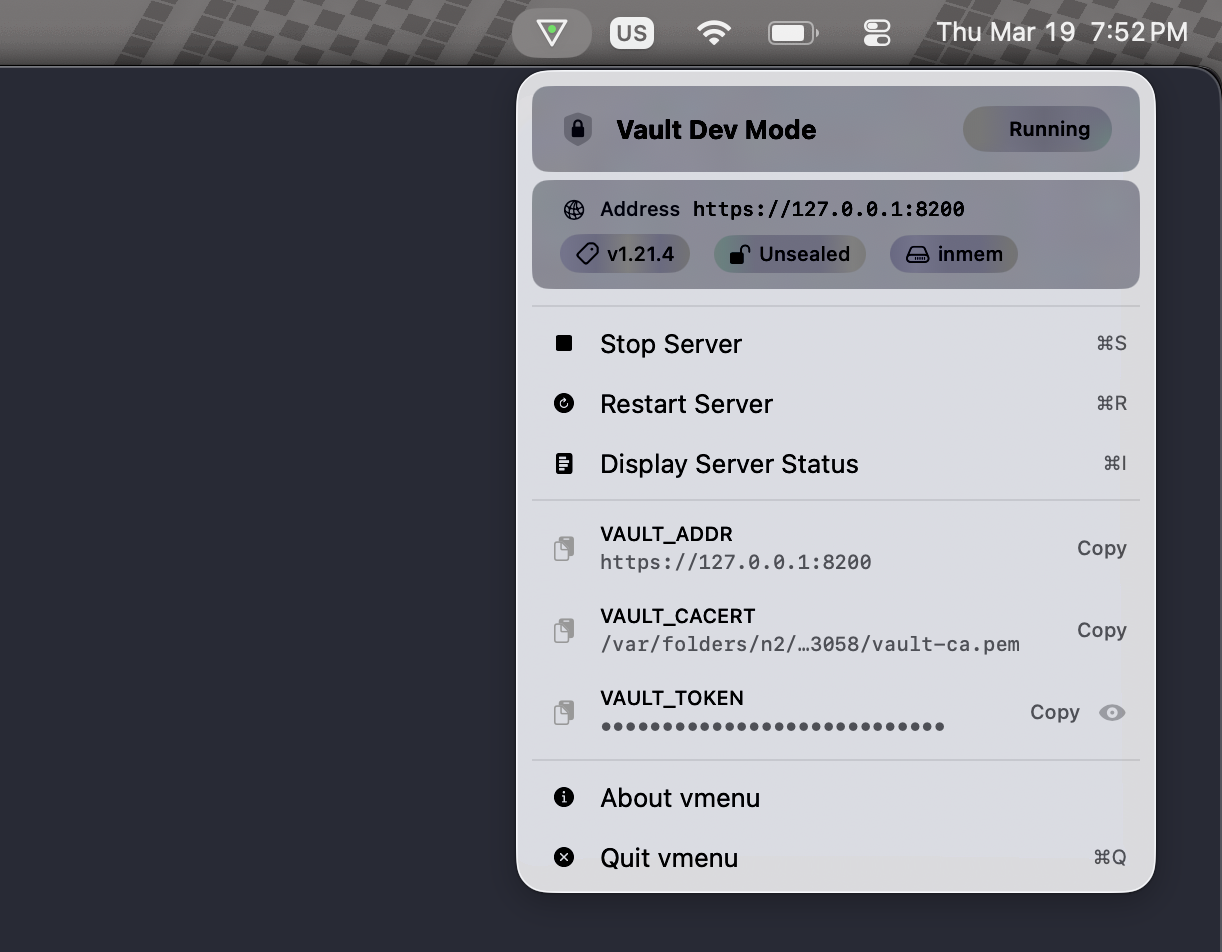
vmenu manages the life-cycle of a Vault dev mode server.
All you need is a vault binary installed and in your system PATH, and you too will soon be on your way to pointing and clicking to a nice new Vault whenever you need one.
Some of the ways that vmenu can help you manage your Vault dev mode server:
- Start/stop/restart a Vault dev server with a click or keyboard shortcut.
- Server readiness menu bar icon indicator — green (unsealed), orange (sealed), red (stopped).
- One-click copy of VAULT_ADDR, VAULT_CACERT, and VAULT_TOKEN export commands for Terminal session use. You can also copy or view the initial root token value right from the menu.
- Server status at a glance: Vault version, seal status, storage backend, address, and unseal key along with raw status output.
- macOS-native — pure SwiftUI, lightweight, no Electron, no runtime dependencies.
- Fully sandboxed: The main app runs inside the App Sandbox; privileged operations get delegated to a sandboxed XPC helper via SMAppService.
- launchd integration — manages Vault through a proper LaunchAgent.
- Keyboard shortcuts for every menu action (⌘S, ⌘R, ⌘I, ⌘Q).
vmenu also displays a handy status indicator in its menu bar icon so you know your Vault status at a glance. The menu bar icon has a colored dot in the center that reflects one of these possible Vault server states:
| Icon | State |
|---|---|
| 🟢 Green | Vault unsealed and ready for use. |
| 🟠 Orange | Vault sealed and not available for use until unsealed. |
| 🔴 Red | Vault stopped and not available for use. |
If I have piqued your curiosity, check out the code. You can compile it or download a pre-compiled and notarized binary.
Check out the code
If you want to access the code, you can find vmenu released under the BSD 2 clause license on GitHub.
vmenu is 100% a personal itch-scratcher type project, and for that reason the project remains closed to contributions, but you’re free to take the code and use it however you like within the parameters of the LICENSE.
Enjoy!